
2.9 KiB
Running on Azure
Publishing a Node-based site to Azure was painless, thanks to their friendly web portal and GitHub integration. Getting a fully operational site, however, took a bit more time.
Unfortunately, because Azure's underlying server technology is Windows-based (IIS), some of the same Windows/Unix portability problems that have plagued us for decades still plague us today: carriage returns and backslashes.
Even though all PCjs text files in my project contain only linefeeds, IIS would serve them up with CR/LF instead. I first noticed this on the client side, when an XML file retrieved via XMLHttpRequest() came back full of CR/LFs, and later on the server side, when fs.readFile() returned a Markdown file filled with CR/LFs.
I wondered if the CR/LF transformation had happened when Azure pulled all my files from GitHub, because while I can understand some whitespace inconsistencies across web servers, I would never expect file system calls on the server to modify file contents.
I finally confirmed that the files were indeed modified on the server, by using Azure's FTP browser. For example,
minimal.xml is currently 622 bytes locally, but on the Azure server, the
reported size is 632 bytes -- one extra CR for each of the file's 10 lines. After a little more digging, I
learned something new about Git: it has a
setting called core.autocrlf which, for me on OS X, defaults to input (meaning "convert CR/LF to LF on commit
but do NOT convert LF back to CR/LF on check-out"). But Azure apparently sets this to true, causing all LFs to be
converted to CR/LF.
Regarding slashes, even when path components contained only slashes, path.join() would return paths with backslashes. And unfortunately, this behavior varies from Node module to module. For example, I use the NPM glob module, and even when the input path to glob() contains backslashes, its output paths do not.
In the process of fixing those portability issues, I also had some trouble getting Azure logging to work as
documented. Setting loggingEnabled: true in /IISNode.yml would generate logs in /site/wwwroot/iisnode/,
but the logs were numerous and poorly organized.
And the Azure command-line tool that was supposed to enable real-time log-streaming to the console:
azure site log tail pcjs
would happily report:
Welcome, you are now connected to log-streaming service
but it would NEVER display anything but deployment information. Instead, I had to browse the log files using Azure's "FTP DIAGNOSTIC LOGS" link on the web portal -- which presents the logs as one big, ugly, fragmented mess:
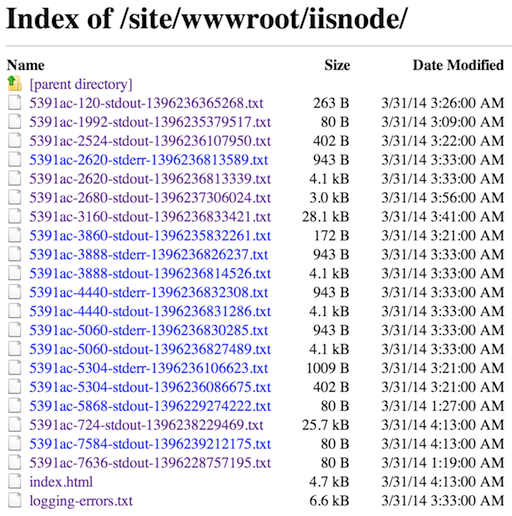
Sigh. But at least the site is up and fully operational now.
@jeffpar
March 30, 2014