
39 KiB
| title | author | date | isbn | publisher | category | chapter | pages |
|---|---|---|---|---|---|---|---|
| Michael Abrash's Graphics Programming Black Book, Special Edition | Michael Abrash | 1997-07-01 | 1576101746 | The Coriolis Group | Web and Software Development: Game Development,Web and Software Development: Graphics and Multimedia Development | 67 | 1223-1241 |
Chapter 67\
Sorted Spans in Action
Implementing Independent Span Sorting for Rendering without Overdraw
In Chapter 66, we dove headlong into the intricacies of hidden surface removal by way of z-sorted (actually, 1/z-sorted) spans. At the end of that chapter, I noted that we were currently using 1/z-sorted spans in Quake, but it was unclear whether we'd switch back to BSP order. Well, some time after that writing, it's become clear: We're back to sorting spans by BSP order.
In Robert A. Heinlein's wonderful story "The Man Who Sold the Moon," the chief engineer of the Moon rocket project tries to figure out how to get a payload of three astronauts to the Moon and back. He starts out with a four-stage rocket design, but finds that it won't do the job, so he adds a fifth stage. The fifth stage helps, but not quite enough, "Because," he explains, "I've had to add in too much dead weight, that's why." (The dead weight is the control and safety equipment that goes with the fifth stage.) He then tries adding yet another stage, only to find that the sixth stage actually results in a net slowdown. In the end, he has to give up on the three-person design and build a one-person spacecraft instead.
1/z-sorted spans in Quake turned out pretty much the same way, as we'll see in a moment. First, though, I'd like to note up front that this chapter is very technical and builds heavily on material I covered earlier in this section of the book; if you haven't already read Chapters 59 through 66, you really should. Make no mistake about it, this is commercial-quality stuff; in fact, the code in this chapter uses the same sorting technique as the test version of Quake, QTEST1.ZIP, that id Software placed on the Internet in early March 1996. This material is the Real McCoy, true reports from the leading edge, and I trust that you'll be patient if careful rereading and some occasional catch-up reading of earlier chapters are required to absorb everything contained herein. Besides, the ultimate reference for any design is working code, which you'll find, in part, in Listing 67.1, and in its entirety in the file DDJZSORT.ZIP on the CD-ROM.
Quake and Sorted Spans
As you'll recall from Chapter 66, Quake uses sorted spans to get zero overdraw while rendering the world, thereby both improving overall performance and leveling frame rates by speeding up scenes that would otherwise experience heavy overdraw. Our original design used spans sorted by BSP order; because we traverse the world BSP tree from front-to-back relative to the viewpoint, the order in which BSP nodes are visited is a guaranteed front-to-back sorting order. We simply gave each node an increasing BSP sequence number as it was visited, set each polygon's sort key to the BSP sequence number of the node (BSP splitting plane) it lay on, and used those sort keys when generating spans.
(In a change from earlier designs, polygons now are stored on nodes, rather than leaves, which are the convex subspaces carved out by the BSP tree. Visits to potentially visible leaves are used only to mark that the polygons that touch those leaves are visible and need to be drawn, and each marked-visible polygon is then drawn after everything in front of its node has been drawn. This results in less BSP splitting of polygons, which is A Good Thing, as explained below.)
This worked flawlessly for the world, but had a couple of downsides. First, it didn't address the issue of sorting small, moving BSP models such as doors; those models could be clipped into the world BSP tree's leaves and assigned sort keys corresponding to the leaves into which they fell, but there was still the question of how to sort multiple BSP models in the same world leaf against each other. Second, strict BSP order requires that polygons be split so that every polygon falls entirely within a single leaf. This can be stretched by putting polygons on nodes, allowing for larger polygons on average, but even then, polygons still need to be split so that every polygon falls within the bounding volume for the node on which it lies. The end result, in either case, is more and smaller polygons than if BSP order weren't used—and that, in turn, means lower performance, because more polygons must be clipped, transformed, and projected, more sorting must be done, and more spans must be drawn.
We figured that if only we could avoid those BSP splits, Quake would get a lot faster. Accordingly, we switched from sorting on BSP order to sorting on 1/z, and left our polygons unsplit. Things did get faster at first, but not as much as we had expected, for two reasons.
First, as the world BSP tree is descended, we clip each node's bounding box in turn to see if it's inside or outside each plane of the view frustum. The clipping results can be remembered, and often allow the avoidance of some or all clipping for the node's polygons. For example, all polygons in a node that has a trivially accepted bounding box are likewise guaranteed to be unclipped and in the frustum, since they all lie within the node's volume and need no further clipping. This efficient clipping mechanism vanished as soon as we stepped out of BSP order, because a polygon was no longer necessarily confined to its node's volume.
Second, sorting on 1/z isn't as cheap as sorting on BSP order, because floating-point calculations and comparisons are involved, rather than integer compares. So Quake got faster but, like Heinlein's fifth rocket stage, there was clear evidence of diminishing returns.
That wasn't the bad part; after all, even a small speed increase is A Good Thing. The real problem was that our initial 1/z sorting proved to be unreliable. We first ran into problems when two forward-facing polygons started at a common edge, because it was hard to tell which one was really in front (as discussed below), and we had to do additional floating-point calculations to resolve these cases. This fixed the problems for a while, but then odd cases started popping up where just the right combination of polygon alignments caused new sorting errors. We tinkered with those too, adding more code and incurring additional slowdowns in the process. Finally, we had everything working smoothly again, although by this point Quake was back to pretty much the same speed it had been with BSP sorting.
And then yet another crop of sorting errors popped up.
We could have fixed those errors too; we'll take a quick look at how to deal with such cases shortly. However, like the sixth rocket stage, the fixes would have made Quake slower than it had been with BSP sorting. So we gave up and went back to BSP order, and now the code is simpler and sorting works reliably. It's too bad our experiment didn't work out, but it wasn't wasted time because in trying what we did we learned quite a bit. In particular, we learned that the information provided by a simple, reliable world ordering mechanism, such as a BSP tree, can do more good than is immediately apparent, in terms of both performance and solid code.
Nonetheless, sorting on 1/z can be a valuable tool, used in the right context; drawing a Quake world just doesn't happen to be such a case. In fact, sorting on 1/z is how we're now handling the sorting of multiple BSP models that lie within the same world leaf in Quake. In this case, we don't have the option of using BSP order (because we're drawing multiple independent trees), so we've set restrictions on the BSP models to avoid running into the types of 1/z sorting errors we encountered drawing the Quake world. Next, we'll look at another application in which sorting on 1/z is quite useful, one where objects move freely through space. As is so often the case in 3-D, there is no one "right" technique, but rather a great many different techniques, each one handy in the right situations. Often, a combination of techniques is beneficial; for example, the combination in Quake of BSP sorting for the world and 1/z sorting for BSP models in the same world leaf.
For the remainder of this chapter, I'm going to look at the three main types of 1/z span sorting, then discuss a sample 3-D app built around 1/z span sorting.
Types of 1/z Span Sorting
As a quick refresher: With 1/z span sorting, all the polygons in a scene are treated as sets of screenspace pixel spans, and 1/z (where z is distance from the viewpoint in viewspace, as measured along the viewplane normal) is used to sort the spans so that the nearest span overlapping each pixel is drawn. As I discussed in Chapter 66, in the sample program we're actually going to do all our sorting with polygon edges, which represent spans in an implicit form.
There are three types of 1/z span sorting, each requiring a different implementation. In order of increasing speed and decreasing complexity, they are: intersecting, abutting, and independent. (These are names of my own devising; I haven't come across any standard nomenclature in the literature.)
Intersecting Span Sorting
Intersecting span sorting occurs when polygons can interpenetrate. Thus, two spans may cross such that part of each span is visible, in which case the spans have to be split and drawn appropriately, as shown in Figure 67.1.
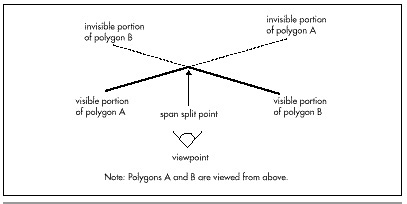
Intersecting is the slowest and most complicated type of span sorting, because it is necessary to compare 1/z values at two points in order to detect interpenetration, and additional work must be done to split the spans as necessary. Thus, although intersecting span sorting certainly works, it's not the first choice for performance.
Abutting Span Sorting
Abutting span sorting occurs when polygons that are not part of a continuous surface can butt up against one another, but don't interpenetrate, as shown in Figure 67.2. This is the sorting used in Quake, where objects like doors often abut walls and floors, and turns out to be more complicated than you might think. The problem is that when an abutting polygon starts on a given scan line, as with polygon B in Figure 67.2, it starts at exactly the same 1/z value as the polygon it abuts, in this case, polygon A, so additional sorting is needed when these ties happen. Of course, the two-point sorting used for intersecting polygons would work, but we'd like to find something faster.
As it turns out, the additional sorting for abutting polygons is actually quite simple; whichever polygon has a greater 1/z gradient with respect to screen x (that is, whichever polygon is heading fastest toward the viewer along the scan line) is the front one. The hard part is identifying when ties—that is, abutting polygons—occur; due to floating-point imprecision, as well as fixed-point edge-stepping imprecision that can move an edge slightly on the screen, calculations of 1/z from the combination of screen coordinates and 1/z gradients (as discussed last time) can be slightly off, so most tie cases will show up as near matches, not exact matches. This imprecision makes it necessary to perform two comparisons, one with an adjust-up by a small epsilon and one with an adjust-down, creating a range in which near-matches are considered matches. Fine-tuning this epsilon to catch all ties, without falsely reporting close-but-not-abutting edges as ties, proved to be troublesome in Quake, and the epsilon calculations and extra comparisons slowed things down.
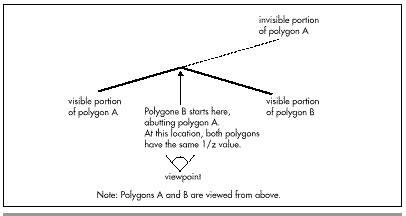
I do think that abutting 1/z span sorting could have been made reliable enough for production use in Quake, were it not that we share edges between adjacent polygons in Quake, so that the world is a large polygon mesh. When a polygon ends and is followed by an adjacent polygon that shares the edge that just ended, we simply assume that the adjacent polygon sorts relative to other active polygons in the same place as the one that ended (because the mesh is continuous and there's no interpenetration), rather than doing a 1/z sort from scratch. This speeds things up by saving a lot of sorting, but it means that if there is a sorting error, a whole string of adjacent polygons can be sorted incorrectly, pulled in by the one missorted polygon. Missorting is a very real hazard when a polygon is very nearly perpendicular to the screen, so that the 1/z calculations push the limits of numeric precision, especially in single-precision floating point.
Many caching schemes are possible with abutting span sorting, because any given pair of polygons, being noninterpenetrating, will sort in the same order throughout a scene. However, in Quake at least, the benefits of caching sort results were outweighed by the additional overhead of maintaining the caching information, and every caching variant we tried actually slowed Quake down.
Independent Span Sorting
Finally, we come to independent span sorting, the simplest and fastest of the three, and the type the sample code in Listing 67.1 uses. Here, polygons never intersect or touch any other polygons except adjacent polygons with which they form a continuous mesh. This means that when a polygon starts on a scan line, a single 1/z comparison between that polygon and the polygons it overlaps on the screen is guaranteed to produce correct sorting, with no extra calculations or tricky cases to worry about.
Independent span sorting is ideal for scenes with lots of moving objects that never actually touch each other, such as a space battle. Next, we'll look at an implementation of independent 1/z span sorting.
1/z Span Sorting in Action
Listing 67.1 is a portion of a program that demonstrates independent 1/z span sorting. This program is based on the sample 3-D clipping program from Chapter 65; however, the earlier program did hidden surface removal (HSR) by simply z-sorting whole objects and drawing them back-to-front, while Listing 67.1 draws all polygons by way of a 1/z-sorted edge list. Consequently, where the earlier program worked only so long as object centers correctly described sorting order, Listing 67.1 works properly for all combinations of non-intersecting and non-abutting polygons. In particular, Listing 67.1 correctly handles concave polyhedra; a new L-shaped object (the data for which is not included in Listing 67.1) has been added to the sample program to illustrate this capability. The ability to handle complex shapes makes Listing 67.1 vastly more useful for real-world applications than the 3-D clipping demo from Chapter 65.
Listing 67.1 L67_1.C
// Part of Win32 program to demonstrate z-sorted spans. Whitespace
// removed for space reasons. Full source code, with whitespace,
// available from ftp.idsoftware.com/mikeab/ddjzsort.zip.
#define MAX_SPANS 10000
#define MAX_SURFS 1000
#define MAX_EDGES 5000
typedef struct surf_s {
struct surf_s *pnext, *pprev;
int color, visxstart, state;
double zinv00, zinvstepx, zinvstepy;
} surf_t;
typedef struct edge_s {
int x, xstep, leading;
surf_t *psurf;
struct edge_s *pnext, *pprev, *pnextremove;
} edge_t;
// Span, edge, and surface lists
span_t spans[MAX_SPANS];
edge_t edges[MAX_EDGES];
surf_t surfs[MAX_SURFS];
// Bucket list of new edges to add on each scan line
edge_t newedges[MAX_SCREEN_HEIGHT];
// Bucket list of edges to remove on each scan line
edge_t *removeedges[MAX_SCREEN_HEIGHT];
// Head and tail for the active edge list
edge_t edgehead, edgetail;
// Edge used as sentinel of new edge lists
edge_t maxedge = {0x7FFFFFFF};
// Head/tail/sentinel/background surface of active surface stack
surf_t surfstack;
// pointers to next available surface and edge
surf_t *pavailsurf;
edge_t *pavailedge;
// Returns true if polygon faces the viewpoint, assuming a clockwise
// winding of vertices as seen from the front.
int PolyFacesViewer(polygon_t *ppoly, plane_t *pplane)
{
int i;
point_t viewvec;
for (i=0 ; i<3 ; i++)
viewvec.v[i] = ppoly->verts[0].v[i] - currentpos.v[i];
// Use an epsilon here so we don't get polygons tilted so
// sharply that the gradients are unusable or invalid
if (DotProduct (&viewvec, &pplane->normal) < -0.01)
return 1;
return 0;
}
// Add the polygon's edges to the global edge table.
void AddPolygonEdges (plane_t *plane, polygon2D_t *screenpoly)
{
double distinv, deltax, deltay, slope;
int i, nextvert, numverts, temp, topy, bottomy, height;
edge_t *pedge;
numverts = screenpoly->numverts;
// Clamp the polygon's vertices just in case some very near
// points have wandered out of range due to floating-point
// imprecision
for (i=0 ; i<numverts ; i++) {
if (screenpoly->verts[i].x < -0.5)
screenpoly->verts[i].x = -0.5;
if (screenpoly->verts[i].x > ((double)DIBWidth - 0.5))
screenpoly->verts[i].x = (double)DIBWidth - 0.5;
if (screenpoly->verts[i].y < -0.5)
screenpoly->verts[i].y = -0.5;
if (screenpoly->verts[i].y > ((double)DIBHeight - 0.5))
screenpoly->verts[i].y = (double)DIBHeight - 0.5;
}
// Add each edge in turn
for (i=0 ; i<numverts ; i++) {
nextvert = i + 1;
if (nextvert >= numverts)
nextvert = 0;
topy = (int)ceil(screenpoly->verts[i].y);
bottomy = (int)ceil(screenpoly->verts[nextvert].y);
height = bottomy - topy;
if (height == 0)
continue; // doesn't cross any scan lines
if (height < 0) {
// Leading edge
temp = topy;
topy = bottomy;
bottomy = temp;
pavailedge->leading = 1;
deltax = screenpoly->verts[i].x -
screenpoly->verts[nextvert].x;
deltay = screenpoly->verts[i].y -
screenpoly->verts[nextvert].y;
slope = deltax / deltay;
// Edge coordinates are in 16.16 fixed point
pavailedge->xstep = (int)(slope * (float)0x10000);
pavailedge->x = (int)((screenpoly->verts[nextvert].x +
((float)topy - screenpoly->verts[nextvert].y) *
slope) * (float)0x10000);
} else {
// Trailing edge
pavailedge->leading = 0;
deltax = screenpoly->verts[nextvert].x -
screenpoly->verts[i].x;
deltay = screenpoly->verts[nextvert].y -
screenpoly->verts[i].y;
slope = deltax / deltay;
// Edge coordinates are in 16.16 fixed point
pavailedge->xstep = (int)(slope * (float)0x10000);
pavailedge->x = (int)((screenpoly->verts[i].x +
((float)topy - screenpoly->verts[i].y) * slope) *
(float)0x10000);
}
// Put the edge on the list to be added on top scan
pedge = &newedges[topy];
while (pedge->pnext->x < pavailedge->x)
pedge = pedge->pnext;
pavailedge->pnext = pedge->pnext;
pedge->pnext = pavailedge;
// Put the edge on the list to be removed after final scan
pavailedge->pnextremove = removeedges[bottomy - 1];
removeedges[bottomy - 1] = pavailedge;
// Associate the edge with the surface we'll create for
// this polygon
pavailedge->psurf = pavailsurf;
// Make sure we don't overflow the edge array
if (pavailedge < &edges[MAX_EDGES])
pavailedge++;
}
// Create the surface, so we'll know how to sort and draw from
// the edges
pavailsurf->state = 0;
pavailsurf->color = currentcolor;
// Set up the 1/z gradients from the polygon, calculating the
// base value at screen coordinate 0,0 so we can use screen
// coordinates directly when calculating 1/z from the gradients
distinv = 1.0 / plane->distance;
pavailsurf->zinvstepx = plane->normal.v[0] * distinv *
maxscreenscaleinv * (fieldofview / 2.0);
pavailsurf->zinvstepy = -plane->normal.v[1] * distinv *
maxscreenscaleinv * (fieldofview / 2.0);
pavailsurf->zinv00 = plane->normal.v[2] * distinv -
xcenter * pavailsurf->zinvstepx -
ycenter * pavailsurf->zinvstepy;
// Make sure we don't overflow the surface array
if (pavailsurf < &surfs[MAX_SURFS])
pavailsurf++;
}
// Scan all the edges in the global edge table into spans.
void ScanEdges (void)
{
int x, y;
double fx, fy, zinv, zinv2;
edge_t *pedge, *pedge2, *ptemp;
span_t *pspan;
surf_t *psurf, *psurf2;
pspan = spans;
// Set up the active edge list as initially empty, containing
// only the sentinels (which are also the background fill). Most
// of these fields could be set up just once at start-up
edgehead.pnext = &edgetail;
edgehead.pprev = NULL;
edgehead.x = -0xFFFF; // left edge of screen
edgehead.leading = 1;
edgehead.psurf = &surfstack;
edgetail.pnext = NULL; // mark edge of list
edgetail.pprev = &edgehead;
edgetail.x = DIBWidth << 16; // right edge of screen
edgetail.leading = 0;
edgetail.psurf = &surfstack;
// The background surface is the entire stack initially, and
// is infinitely far away, so everything sorts in front of it.
// This could be set just once at start-up
surfstack.pnext = surfstack.pprev = &surfstack;
surfstack.color = 0;
surfstack.zinv00 = -999999.0;
surfstack.zinvstepx = surfstack.zinvstepy = 0.0;
for (y=0 ; y<DIBHeight ; y++) {
fy = (double)y;
// Sort in any edges that start on this scan
pedge = newedges[y].pnext;
pedge2 = &edgehead;
while (pedge != &maxedge) {
while (pedge->x > pedge2->pnext->x)
pedge2 = pedge2->pnext;
ptemp = pedge->pnext;
pedge->pnext = pedge2->pnext;
pedge->pprev = pedge2;
pedge2->pnext->pprev = pedge;
pedge2->pnext = pedge;
pedge2 = pedge;
pedge = ptemp;
}
// Scan out the active edges into spans
// Start out with the left background edge already inserted,
// and the surface stack containing only the background
surfstack.state = 1;
surfstack.visxstart = 0;
for (pedge=edgehead.pnext ; pedge ; pedge=pedge->pnext) {
psurf = pedge->psurf;
if (pedge->leading) {
// It's a leading edge. Figure out where it is
// relative to the current surfaces and insert in
// the surface stack; if it's on top, emit the span
// for the current top.
// First, make sure the edges don't cross
if (++psurf->state == 1) {
fx = (double)pedge->x * (1.0 / (double)0x10000);
// Calculate the surface's 1/z value at this pixel
zinv = psurf->zinv00 + psurf->zinvstepx * fx +
psurf->zinvstepy * fy;
// See if that makes it a new top surface
psurf2 = surfstack.pnext;
zinv2 = psurf2->zinv00 + psurf2->zinvstepx * fx +
psurf2->zinvstepy * fy;
if (zinv >= zinv2) {
// It's a new top surface
// emit the span for the current top
x = (pedge->x + 0xFFFF) >> 16;
pspan->count = x - psurf2->visxstart;
if (pspan->count > 0) {
pspan->y = y;
pspan->x = psurf2->visxstart;
pspan->color = psurf2->color;
// Make sure we don't overflow
// the span array
if (pspan < &spans[MAX_SPANS])
pspan++;
}
psurf->visxstart = x;
// Add the edge to the stack
psurf->pnext = psurf2;
psurf2->pprev = psurf;
surfstack.pnext = psurf;
psurf->pprev = &surfstack;
} else {
// Not a new top; sort into the surface stack.
// Guaranteed to terminate due to sentinel
// background surface
do {
psurf2 = psurf2->pnext;
zinv2 = psurf2->zinv00 +
psurf2->zinvstepx * fx +
psurf2->zinvstepy * fy;
} while (zinv < zinv2);
// Insert the surface into the stack
psurf->pnext = psurf2;
psurf->pprev = psurf2->pprev;
psurf2->pprev->pnext = psurf;
psurf2->pprev = psurf;
}
}
} else {
// It's a trailing edge; if this was the top surface,
// emit the span and remove it.
// First, make sure the edges didn't cross
if (—psurf->state == 0) {
if (surfstack.pnext == psurf) {
// It's on top, emit the span
x = ((pedge->x + 0xFFFF) >> 16);
pspan->count = x - psurf->visxstart;
if (pspan->count > 0) {
pspan->y = y;
pspan->x = psurf->visxstart;
pspan->color = psurf->color;
// Make sure we don't overflow
// the span array
if (pspan < &spans[MAX_SPANS])
pspan++;
}
psurf->pnext->visxstart = x;
}
// Remove the surface from the stack
psurf->pnext->pprev = psurf->pprev;
psurf->pprev->pnext = psurf->pnext;
}
}
}
// Remove edges that are done
pedge = removeedges[y];
while (pedge) {
pedge->pprev->pnext = pedge->pnext;
pedge->pnext->pprev = pedge->pprev;
pedge = pedge->pnextremove;
}
// Step the remaining edges one scan line, and re-sort
for (pedge=edgehead.pnext ; pedge != &edgetail ; ) {
ptemp = pedge->pnext;
// Step the edge
pedge->x += pedge->xstep;
// Move the edge back to the proper sorted location,
// if necessary
while (pedge->x < pedge->pprev->x) {
pedge2 = pedge->pprev;
pedge2->pnext = pedge->pnext;
pedge->pnext->pprev = pedge2;
pedge2->pprev->pnext = pedge;
pedge->pprev = pedge2->pprev;
pedge->pnext = pedge2;
pedge2->pprev = pedge;
}
pedge = ptemp;
}
}
pspan->x = -1; // mark the end of the list
}
// Draw all the spans that were scanned out.
void DrawSpans (void)
{
span_t *pspan;
for (pspan=spans ; pspan->x != -1 ; pspan++)
memset (pDIB + (DIBPitch * pspan->y) + pspan->x,
pspan->color,
pspan->count);
}
// Clear the lists of edges to add and remove on each scan line.
void ClearEdgeLists(void)
{
int i;
for (i=0 ; i<DIBHeight ; i++) {
newedges[i].pnext = &maxedge;
removeedges[i] = NULL;
}
}
// Render the current state of the world to the screen.
void UpdateWorld()
{
HPALETTE holdpal;
HDC hdcScreen, hdcDIBSection;
HBITMAP holdbitmap;
polygon2D_t screenpoly;
polygon_t *ppoly, tpoly0, tpoly1, tpoly2;
convexobject_t *pobject;
int i, j, k;
plane_t plane;
point_t tnormal;
UpdateViewPos();
SetUpFrustum();
ClearEdgeLists();
pavailsurf = surfs;
pavailedge = edges;
// Draw all visible faces in all objects
pobject = objecthead.pnext;
while (pobject != &objecthead) {
ppoly = pobject->ppoly;
for (i=0 ; i<pobject->numpolys ; i++) {
// Move the polygon relative to the object center
tpoly0.numverts = ppoly[i].numverts;
for (j=0 ; j<tpoly0.numverts ; j++) {
for (k=0 ; k<3 ; k++)
tpoly0.verts[j].v[k] = ppoly[i].verts[j].v[k] +
pobject->center.v[k];
}
if (PolyFacesViewer(&tpoly0, &ppoly[i].plane)) {
if (ClipToFrustum(&tpoly0, &tpoly1)) {
currentcolor = ppoly[i].color;
TransformPolygon (&tpoly1, &tpoly2);
ProjectPolygon (&tpoly2, &screenpoly);
// Move the polygon's plane into viewspace
// First move it into worldspace (object relative)
tnormal = ppoly[i].plane.normal;
plane.distance = ppoly[i].plane.distance +
DotProduct (&pobject->center, &tnormal);
// Now transform it into viewspace
// Determine the distance from the viewpont
plane.distance -=
DotProduct (¤tpos, &tnormal);
// Rotate the normal into view orientation
plane.normal.v[0] =
DotProduct (&tnormal, &vright);
plane.normal.v[1] =
DotProduct (&tnormal, &vup);
plane.normal.v[2] =
DotProduct (&tnormal, &vpn);
AddPolygonEdges (&plane, &screenpoly);
}
}
}
pobject = pobject->pnext;
}
ScanEdges ();
DrawSpans ();
// We've drawn the frame; copy it to the screen
hdcScreen = GetDC(hwndOutput);
holdpal = SelectPalette(hdcScreen, hpalDIB, FALSE);
RealizePalette(hdcScreen);
hdcDIBSection = CreateCompatibleDC(hdcScreen);
holdbitmap = SelectObject(hdcDIBSection, hDIBSection);
BitBlt(hdcScreen, 0, 0, DIBWidth, DIBHeight, hdcDIBSection,
0, 0, SRCCOPY);
SelectPalette(hdcScreen, holdpal, FALSE);
ReleaseDC(hwndOutput, hdcScreen);
SelectObject(hdcDIBSection, holdbitmap);
DeleteDC(hdcDIBSection);
}
By the same token, Listing 67.1 is quite a bit more complicated than the earlier code. The earlier code's HSR consisted of a z-sort of objects, followed by the drawing of the objects in back-to-front order, one polygon at a time. Apart from the simple object sorter, all that was needed was backface culling and a polygon rasterizer.
Listing 67.1 replaces this simple pipeline with a three-stage HSR
process. After backface culling, the edges of each of the polygons in
the scene are added to the global edge list, by way of
AddPolygonEdges(). After all edges have been added, the edges are
turned into spans by ScanEdges(), with each pixel on the screen
being covered by one and only one span (that is, there's no overdraw).
Once all the spans have been generated, they're drawn by
DrawSpans(), and rasterization is complete.
There's nothing tricky about AddPolygonEdges(), and DrawSpans(),
as implemented in Listing 67.1, is very straightforward as well. In an
implementation that supported texture mapping, however, all the spans
wouldn't be put on one global span list and drawn at once, as is done in
Listing 67.1, because that would result in drawing spans from all the
surfaces in no particular order. (A surface is a drawing object that's
originally described by a polygon, but in ScanEdges() there is no
polygon in the classic sense of a set of vertices bounding an area, but
rather just a set of edges and a surface that describes how to draw the
spans outlined by those edges.) That would mean constantly skipping from
one texture to another, which in turn would hurt processor cache
coherency a great deal, and would also incur considerable overhead in
setting up gradient and perspective calculations each time a surface was
drawn. In Quake, we have a linked list of spans hanging off each
surface, and draw all the spans for one surface before moving on to the
next surface.
The core of Listing 67.1, and the most complex aspect of 1/z-sorted
spans, is ScanEdges(), where the global edge list is converted into
a set of spans describing the nearest surface at each pixel. This
process is actually pretty simple, though, if you think of it as
follows:
For each scan line, there is a set of active edges, which are those
edges that intersect the scan line. A good part of ScanEdges() is
dedicated to adding any edges that first appear on the current scan line
(scan lines are processed from the top scan line on the screen to the
bottom), removing edges that reach their bottom on the current scan
line, and x-sorting the active edges so that the active edges for the
next scan can be processed from left to right. All this is per-scan-line
maintenance, and is basically just linked list insertion, deletion, and
sorting.
The heart of the action is the loop in ScanEdges() that processes
the edges on the current scan line from left to right, generating spans
as needed. The best way to think of this loop is as a surface event
processor, where each edge is an event with an associated surface. Each
leading edge is an event marking the start of its surface on that scan
line; if the surface is nearer than the current nearest surface, then a
span ends for the nearest surface, and a span starts for the new
surface. Each trailing edge is an event marking the end of its surface;
if its surface is currently nearest, then a span ends for that surface,
and a span starts for the next-nearest surface (the surface with the
next-largest 1/z at the coordinate where the edge intersects the scan
line). One handy aspect of this event-oriented processing is that
leading and trailing edges do not need to be explicitly paired, because
they are implicitly paired by pointing to the same surface. This saves
the memory and time that would otherwise be needed to track edge pairs.
One more element is required in order for ScanEdges() to work
efficiently. Each time a leading or trailing edge occurs, it must be
determined whether its surface is nearest (at a larger 1/z value than
any currently active surface). In addition, for leading edges, the
currently topmost surface must be known, and for trailing edges, it may
be necessary to know the currently next-to-topmost surface. The easiest
way to accomplish this is with a surface stack; that is, a linked list
of all currently active surfaces, starting with the nearest surface and
progressing toward the farthest surface, which, as described below, is
always the background surface. (The operation of this sort of edge
event-based stack was described and illustrated in Chapter 66.) Each
leading edge causes its surface to be 1/z-sorted into the surface stack,
with a span emitted if necessary. Each trailing edge causes its surface
to be removed from the surface stack, again with a span emitted if
necessary. As you can see from Listing 67.1, it takes a fair bit of code
to implement this, but all that's really going on is a surface stack
driven by edge events.
Implementation Notes
Finally, a few notes on Listing 67.1. First, you'll notice that although we clip all polygons to the view frustum in worldspace, we nonetheless later clamp them to valid screen coordinates before adding them to the edge list. This catches any cases where arithmetic imprecision results in clipped polygon vertices that are a bit outside the frustum. I've only found such imprecision to be significant at very small z distances, so clamping would probably be unnecessary if there were a near clip plane, and might not even be needed in Listing 67.1, because of the slight nudge inward that we give the frustum planes, as described in Chapter 65. However, my experience has consistently been that relying on worldspace or viewspace clipping to produce valid screen coordinates 100 percent of the time leads to sporadic and hard-to-debug errors.
There is no separate routine to clear the background in Listing 67.1. Instead, a special background surface at an effectively infinite distance is added, so whenever no polygons are active the background color is drawn. If desired, it's a simple matter to flag the background surface and draw the background specially. For example, the background could be drawn as a starfield or a cloudy sky.
The edge-processing code in Listing 67.1 is fully capable of handling concave polygons as easily as convex polygons, and can handle an arbitrary number of vertices per polygon, as well. One change is needed for the latter case: Storage for the maximum number of vertices per polygon must be allocated in the polygon structures. In a fully polished implementation, vertices would be linked together or pointed to, and would be dynamically allocated from a vertex pool, so each polygon wouldn't have to contain enough space for the maximum possible number of vertices.
Each surface has a field named state, which is incremented when a
leading edge for that surface is encountered, and decremented when a
trailing edge is reached. A surface is activated by a leading edge only
if state increments to 1, and is deactivated by a trailing edge only
if state decrements to 0. This is another guard against arithmetic
problems, in this case quantization during the conversion of vertex
coordinates from floating point to fixed point. Due to this conversion,
it is possible, although rare, for a polygon that is viewed nearly
edge-on to have a trailing edge that occurs slightly before the
corresponding leading edge, and the span-generation code will behave
badly if it tries to emit a span for a surface that hasn't yet started.
It would help performance if this sort of fix-up could be eliminated by
careful arithmetic, but I haven't yet found a way to do so for
1/z-sorted spans.
Lastly, as discussed in Chapter 66, Listing 67.1 uses the gradients for
1/z with respect to changes in screen x and y to calculate 1/z for
active surfaces each time a leading edge needs to be sorted into the
surface stack. The natural origin for gradient calculations is the
center of the screen, which is (x,y) coordinate (0,0) in viewspace.
However, when the gradients are calculated in AddPolygonEdges(), the
origin value is calculated at the upper-left corner of the screen. This
is done so that screen x and y coordinates can be used directly to
calculate 1/z, with no need to adjust the coordinates to be relative to
the center of the screen. Also, the screen gradients grow more extreme
as a polygon is viewed closer to edge-on. In order to keep the gradient
calculations from becoming meaningless or generating errors, a small
epsilon is applied to backface culling, so that polygons that are very
nearly edge-on are culled. This calculation would be more accurate if it
were based directly on the viewing angle, rather than on the dot product
of a viewing ray to the polygon with the polygon normal, but that would
require a square root, and in my experience the epsilon used in Listing
67.1 works fine.