
39 KiB
| title | author | date | isbn | publisher | category | chapter | pages |
|---|---|---|---|---|---|---|---|
| Michael Abrash's Graphics Programming Black Book, Special Edition | Michael Abrash | 1997-07-01 | 1576101746 | The Coriolis Group | Web and Software Development: Game Development,Web and Software Development: Graphics and Multimedia Development | 45 | 839-857 |
Chapter 45\
Dog Hair and Dirty Rectangles
Different Angles on Animation
We brought our pets with us when we moved to Seattle. At about the same time, our Golden Retriever, Sam, observed his third birthday. Sam is relatively intelligent, in the sense that he is clearly smarter than a banana slug, although if he were in the same room with Jeff Duntemann's dog Mr. Byte, there's a reasonable chance that he would mistake Mr. Byte for something edible (a category that includes rocks, socks, and a surprising number of things too disgusting to mention), and Jeff would have to find a new source of things to write about.
But that's not important now. What is important is that—and I am not making this up—this morning I managed to find the one pair of socks Sam hadn't chewed holes in. And what's even more important is that after we moved and Sam turned three, he calmed down amazingly. We had been waiting for this magic transformation since Sam turned one, the age at which most puppies turn into normal dogs who lie around a lot, waking up to eat their Science Diet (motto, "The dog food that costs more than the average neurosurgeon makes in a year") before licking themselves in embarrassing places and going back to sleep. When Sam turned one and remained hopelessly out of control we said, "Goldens take two years to calm down," as if we had a clue. When he turned two and remained undeniably Sam we said, "Any day now." By the time he turned three, we were reduced to figuring that it was only about seven more years until he expired, at which point we might be able to take all the fur he had shed in his lifetime and weave ourselves some clothes without holes in them, or quite possibly a house.
But miracle of miracles, we moved, and Sam instantly turned into the dog we thought we'd gotten when we forked over $500—calm, sweet, and obedient. Weeks went by, and Sam was, if anything, better than ever. Clearly, the change was permanent.
And then we took Sam to the vet for his annual check-up and found that he had an ear infection. Thanks to the wonders of modern animal medicine, a $5 bottle of liquid restored his health in just two days. And with his health, we got, as a bonus, the old Sam. You see, Sam hadn't changed. He was just tired from being sick. Now he once again joyously knocks down any stranger who makes the mistake of glancing in his direction, and will, quite possibly, be booked any day now on suspicion of homicide by licking.
Plus ça Change
Okay, you give up. What exactly does this have to do with graphics? I'm glad you asked. The lesson to be learned from Sam, The Dog With A Brain The Size Of A Walnut, is that while things may look like they've changed, in fact they often haven't. Take VGA performance. If you buy a 486 with a SuperVGA, you'll get performance that knocks your socks off, especially if you run Windows. Things are liable to be so fast that you'll figure the SuperVGA has to deserve some of the credit. Well, maybe it does if it's a local-bus VGA. But maybe it doesn't, even if it is local bus—and it certainly doesn't if it's an ISA bus VGA, because no ISA bus VGA can run faster than about 300 nanoseconds per access, and VGAs capable of that speed have been common for at least a couple of years now.
Your 486 VGA system is fast almost entirely because it has a 486 in it. (486 systems with graphics accelerators such as the ATI Ultra or Diamond Stealth are another story altogether.) Underneath it all, the VGA is still painfully slow—and if you have an old VGA or IBM's original PS/2 motherboard VGA, it's incredibly slow. The fastest ISA-bus VGA around is two to twenty times slower than system memory, and the slowest VGA around is as much as 100 times slower. In the old days, the rule was, "Display memory is slow, and should be avoided." Nowadays, the rule is, "Display memory is not quite so slow, but should still be avoided."
So, as I say, sometimes things don't change. Of course, sometimes they do change. For example, in just 49 dog years, I fully expect to own at least one pair of underwear without a single hole in it. Which brings us, deus ex machina and the creek don't rise, to yet another animation method: dirty-rectangle animation.
VGA Access Times
Actually, before we get to dirty rectangles, I'd like to take you through a quick refresher on VGA memory and I/O access times. I want to do this partly because the slow access times of the VGA make dirty-rectangle animation particularly attractive, and partly as a public service, because even I was shocked by the results of some I/O performance tests I recently ran.
Table 45.1 shows the results of the aforementioned I/O performance
tests, as run on two 486/33 SuperVGA systems under the Phar Lap
386|DOS-Extender. (The systems and VGAs are unnamed because this is a
not-very-scientific spot test, and I don't want to unfairly malign, say,
a VGA whose only sin is being plugged into a lousy motherboard, or vice
versa.) Under Phar Lap, 32-bit protected-mode apps run with full I/O
privileges, meaning that the OUT instructions I measured had the
best official cycle times possible on the 486: 10 cycles. OUT
officially takes 16 cycles in real mode on a 486, and officially takes a
mind-boggling 30 cycles in protected mode if running without full I/O
privileges (as is normally the case for protected-mode applications).
Basically, I/O is just plain slow on a 486.
As slow as 30 or even 10 cycles is for an OUT, one could only wish
that VGA I/O were actually that fast. The fastest measured OUT to a
VGA in Table 45.1 is 26 cycles, and the slowest is 126—this for an
operation that's supposed to take 10 cycles. To put this in context,
MUL takes only 13 to 42 cycles, and a normal MOV to or from
system memory takes exactly one cycle on the 486. In short, OUTs to
VGAs are as much as 100 times slower than normal memory accesses, and
are generally two to four times slower than even display memory
accesses, although there are exceptions.
Of course, VGA display memory has its own performance problems. The fastest ISA bus VGA can, at best, support sustained write times of about 10 cycles per word-sized write on a 486/33; 15 or 20 cycles is more common, even for relatively fast SuperVGAs; the worst case I've seen is 65 cycles per byte. However, intermittent writes, mixed with a lot of register and cache-only code, can effectively execute in one cycle, thanks to the caching design of many VGAs and the 486's 4-deep write buffer, which stores pending writes while the CPU continues executing instructions. Display memory reads tend to take longer, because coprocessing isn't possible—one microsecond is a reasonable rule of thumb for VGA reads, although there's considerable variation. So VGA memory tends not to be as bad as VGA I/O, but lord knows it isn't good.
OUT Time in Microseconds and Cycles
| OUT Instruction | Official Time | 486 #1/16-bit VGA #1 | 486 #2/16-bit VGA #2 |
|---|---|---|---|
| OUT DX,AL repeated 1,000 times nonstop (maximum byte access) | 0.300s 10 cycles | 2.546s 84 cycles | 0.813s 27 cycles |
| OUT DX,AX repeated 1,000 times nonstop (maximum word access) | 0.300s 10 cycles | 3.820s 126 cycles | 1.066s 35 cycles |
| OUT DX,AL repeated 1,000 times, but interspersed with MULs (random byte access) | 0.300s 10 cycles | 1.610s 53 cycles | 0.780s 26 cycles |
| OUT DX,AX repeated 1,000 times, but interspersed with MULs (random word access) | 0.300s 10 cycles | 2.830s 93 cycles | 1.010s 33 cycles |
Table: Table 45.1 Results of I/O performance tests run under the Phar Lap386|DOS-Extender.

OUTs, in general, are lousy on the 486 (and to think they only took three cycles on the 286!).OUTs to VGAs are particularly lousy. Display memory performance is pretty poor, especially for reads. The conclusions are obvious, I would hope. Structure your graphics code, and, in general, all 486 code, to avoidOUTs.
For graphics, this especially means using write mode 3 rather than the bit-mask register. When you must use the bit mask, arrange drawing so that you can set the bit mask once, then do a lot of drawing with that mask. For example, draw a whole edge at once, then the middle, then the other edge, rather than setting the bit mask several times on each scan line to draw the edge and middle bytes together. Don't read from display memory if you don't have to. Write each pixel once and only once.
It is indeed a strange concept: The key to fast graphics is staying away from the graphics adapter as much as possible.
Dirty-Rectangle Animation
The relative slowness of VGA hardware is part of the appeal of the technique that I call "dirty-rectangle" animation, in which a complete copy of the contents of display memory is maintained in offscreen system (nondisplay) memory. All drawing is done to this system buffer. As offscreen drawing is done, a list is maintained of the bounding rectangles for the drawn-to areas; these are the dirty rectangles, "dirty" in the sense that that have been altered and no longer match the contents of the screen. After all drawing for a frame is completed, all the dirty rectangles for that frame are copied to the screen in a burst, and then the cycle of off-screen drawing begins again.
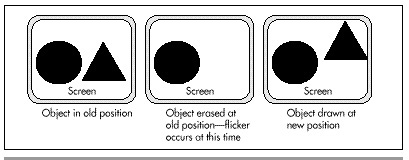
Why, exactly, would we want to go through all this complication, rather than simply drawing to the screen in the first place? The reason is visual quality. If we were to do all our drawing directly to the screen, there'd be a lot of flicker as objects were erased and then redrawn. Similarly, overlapped drawing done with the painter's algorithm (in which farther objects are drawn first, so that nearer objects obscure them) would flicker as farther objects were visible for short periods. With dirty-rectangle animation, only the finished pixels for any given frame ever appear on the screen; intermediate results are never visible. Figure 45.1 illustrates the visual problems associated with drawing directly to the screen; Figure 45.2 shows how dirty-rectangle animation solves these problems.

So Why Not Use Page Flipping?
Well, then, if we want good visual quality, why not use page flipping? For one thing, not all adapters and all modes support page flipping. The CGA and MCGA don't, and neither do the VGA's 640x480 16-color or 320x200 256-color modes, or many SuperVGA modes. In contrast, all adapters support dirty-rectangle animation. Another advantage of dirty-rectangle animation is that it's generally faster. While it may seem strange that it would be faster to draw off-screen and then copy the result to the screen, that is often the case, because dirty-rectangle animation usually reduces the number of times the VGA's hardware needs to be touched, especially in 256-color modes.
This reduction comes about because when dirty rectangles are erased, it's done in system memory, not in display memory, and since most objects move a good deal less than their full width (that is, the new and old positions overlap), display memory is written to fewer times than with page flipping. (In 16-color modes, this is not necessarily the case, because of the parallelism obtained from the VGA's planar hardware.) Also, read/modify/write operations are performed in fast system memory rather than slow display memory, so display memory rarely needs to be read. This is particularly good because display memory is generally even slower for reads than for writes.
Also, page flipping wastes a good deal of time waiting for the page to flip at the end of the frame. Dirty-rectangle animation never needs to wait for anything because partially drawn images are never present in display memory. Actually, in one sense, partially drawn images are sometimes present because it's possible for a rectangle to be partially drawn when the scanning raster beam reaches that part of the screen. This causes the rectangle to appear partially drawn for one frame, producing a phenomenon I call "shearing." Fortunately, shearing tends not to be particularly distracting, especially for fairly small images, but it can be a problem when copying large areas. This is one area in which dirty-rectangle animation falls short of page flipping, because page flipping has perfect display quality, never showing anything other than a completely finished frame. Similarly, dirty-rectangle copying may take two or more frame times to finish, so even if shearing doesn't happen, it's still possible to have the images in the various dirty rectangles show up non-simultaneously. In my experience, this latter phenomenon is not a serious problem, but do be aware of it.
Dirty Rectangles in Action
Listing 45.1 demonstrates dirty-rectangle animation. This is a very simple implementation, in several respects. For one thing, it's written entirely in C, and animation fairly cries out for assembly language. For another thing, it uses far pointers, which C often handles with less than optimal efficiency, especially because I haven't used library functions to copy and fill memory. (I did this so the code would work in any memory model.) Also, Listing 45.1 doesn't attempt to coalesce rectangles so as to perform a minimum number of display-memory accesses; instead, it copies each dirty rectangle to the screen, even if it overlaps with another rectangle, so some pixels are copied multiple times. Listing 45.1 runs pretty well, considering all of its failings; on my 486/33, 10 11x11 images animate at a very respectable clip.
LISTING 45.1 L45-1.C
/* Sample simple dirty-rectangle animation program. Doesn't attempt to coalesce
rectangles to minimize display memory accesses. Not even vaguely optimized!
Tested with Borland C++ in the small model. */
#include <stdlib.h>
#include <conio.h>
#include <alloc.h>
#include <memory.h>
#include <dos.h>
#define SCREEN_WIDTH 320
#define SCREEN_HEIGHT 200
#define SCREEN_SEGMENT 0xA000
/* Describes a rectangle */
typedef struct {
int Top;
int Left;
int Right;
int Bottom;
} Rectangle;
/* Describes an animated object */
typedef struct {
int X; /* upper left corner in virtual bitmap */
int Y;
int XDirection; /* direction and distance of movement */
int YDirection;
} Entity;
/* Storage used for dirty rectangles */
#define MAX_DIRTY_RECTANGLES 100
int NumDirtyRectangles;
Rectangle DirtyRectangles[MAX_DIRTY_RECTANGLES];
/* If set to 1, ignore dirty rectangle list and copy the whole screen. */
int DrawWholeScreen = 0;
/* Pixels for image we'll animate */
#define IMAGE_WIDTH 11
#define IMAGE_HEIGHT 11
char ImagePixels[] = {
15,15,15, 9, 9, 9, 9, 9,15,15,15,
15,15, 9, 9, 9, 9, 9, 9, 9,15,15,
15, 9, 9,14,14,14,14,14, 9, 9,15,
9, 9,14,14,14,14,14,14,14, 9, 9,
9, 9,14,14,14,14,14,14,14, 9, 9,
9, 9,14,14,14,14,14,14,14, 9, 9,
9, 9,14,14,14,14,14,14,14, 9, 9,
9, 9,14,14,14,14,14,14,14, 9, 9,
15, 9, 9,14,14,14,14,14, 9, 9,15,
15,15, 9, 9, 9, 9, 9, 9, 9,15,15,
15,15,15, 9, 9, 9, 9, 9,15,15,15,
};
/* animated entities */
#define NUM_ENTITIES 10
Entity Entities[NUM_ENTITIES];
/* pointer to system buffer into which we'll draw */
char far *SystemBufferPtr;
/* pointer to screen */
char far *ScreenPtr;
void EraseEntities(void);
void CopyDirtyRectanglesToScreen(void);
void DrawEntities(void);
void main()
{
int i, XTemp, YTemp;
unsigned int TempCount;
char far *TempPtr;
union REGS regs;
/* Allocate memory for the system buffer into which we'll draw */
if (!(SystemBufferPtr = farmalloc((unsigned int)SCREEN_WIDTH*
SCREEN_HEIGHT))) {
printf("Couldn't get memory\n");
exit(1);
}
/* Clear the system buffer */
TempPtr = SystemBufferPtr;
for (TempCount = ((unsigned)SCREEN_WIDTH*SCREEN_HEIGHT); TempCount--; ) {
*TempPtr++ = 0;
}
/* Point to the screen */
ScreenPtr = MK_FP(SCREEN_SEGMENT, 0);
/* Set up the entities we'll animate, at random locations */
randomize();
for (i = 0; i < NUM_ENTITIES; i++) {
Entities[i].X = random(SCREEN_WIDTH - IMAGE_WIDTH);
Entities[i].Y = random(SCREEN_HEIGHT - IMAGE_HEIGHT);
Entities[i].XDirection = 1;
Entities[i].YDirection = -1;
}
/* Set 320x200 256-color graphics mode */
regs.x.ax = 0x0013;
int86(0x10, ®s, ®s);
/* Loop and draw until a key is pressed */
do {
/* Draw the entities to the system buffer at their current locations,
updating the dirty rectangle list */
DrawEntities();
/* Draw the dirty rectangles, or the whole system buffer if
appropriate */
CopyDirtyRectanglesToScreen();
/* Reset the dirty rectangle list to empty */
NumDirtyRectangles = 0;
/* Erase the entities in the system buffer at their old locations,
updating the dirty rectangle list */
EraseEntities();
/* Move the entities, bouncing off the edges of the screen */
for (i = 0; i < NUM_ENTITIES; i++) {
XTemp = Entities[i].X + Entities[i].XDirection;
YTemp = Entities[i].Y + Entities[i].YDirection;
if ((XTemp < 0) || ((XTemp + IMAGE_WIDTH) > SCREEN_WIDTH)) {
Entities[i].XDirection = -Entities[i].XDirection;
XTemp = Entities[i].X + Entities[i].XDirection;
}
if ((YTemp < 0) || ((YTemp + IMAGE_HEIGHT) > SCREEN_HEIGHT)) {
Entities[i].YDirection = -Entities[i].YDirection;
YTemp = Entities[i].Y + Entities[i].YDirection;
}
Entities[i].X = XTemp;
Entities[i].Y = YTemp;
}
} while (!kbhit());
getch(); /* clear the keypress */
/* Back to text mode */
regs.x.ax = 0x0003;
int86(0x10, ®s, ®s);
}
/* Draw entities at current locations, updating dirty rectangle list. */
void DrawEntities()
{
int i, j, k;
char far *RowPtrBuffer;
char far *TempPtrBuffer;
char far *TempPtrImage;
for (i = 0; i < NUM_ENTITIES; i++) {
/* Remember the dirty rectangle info for this entity */
if (NumDirtyRectangles >= MAX_DIRTY_RECTANGLES) {
/* Too many dirty rectangles; just redraw the whole screen */
DrawWholeScreen = 1;
} else {
/* Remember this dirty rectangle */
DirtyRectangles[NumDirtyRectangles].Left = Entities[i].X;
DirtyRectangles[NumDirtyRectangles].Top = Entities[i].Y;
DirtyRectangles[NumDirtyRectangles].Right =
Entities[i].X + IMAGE_WIDTH;
DirtyRectangles[NumDirtyRectangles++].Bottom =
Entities[i].Y + IMAGE_HEIGHT;
}
/* Point to the destination in the system buffer */
RowPtrBuffer = SystemBufferPtr + (Entities[i].Y * SCREEN_WIDTH) +
Entities[i].X;
/* Point to the image to draw */
TempPtrImage = ImagePixels;
/* Copy the image to the system buffer */
for (j = 0; j < IMAGE_HEIGHT; j++) {
/* Copy a row */
for (k = 0, TempPtrBuffer = RowPtrBuffer; k < IMAGE_WIDTH; k++) {
*TempPtrBuffer++ = *TempPtrImage++;
}
/* Point to the next system buffer row */
RowPtrBuffer += SCREEN_WIDTH;
}
}
}
/* Copy the dirty rectangles, or the whole system buffer if appropriate,
to the screen. */
void CopyDirtyRectanglesToScreen()
{
int i, j, k, RectWidth, RectHeight;
unsigned int TempCount;
unsigned int Offset;
char far *TempPtrScreen;
char far *TempPtrBuffer;
if (DrawWholeScreen) {
/* Just copy the whole buffer to the screen */
DrawWholeScreen = 0;
TempPtrScreen = ScreenPtr;
TempPtrBuffer = SystemBufferPtr;
for (TempCount = ((unsigned)SCREEN_WIDTH*SCREEN_HEIGHT); TempCount--; ) {
*TempPtrScreen++ = *TempPtrBuffer++;
}
} else {
/* Copy only the dirty rectangles */
for (i = 0; i < NumDirtyRectangles; i++) {
/* Offset in both system buffer and screen of image */
Offset = (unsigned int) (DirtyRectangles[i].Top * SCREEN_WIDTH) +
DirtyRectangles[i].Left;
/* Dimensions of dirty rectangle */
RectWidth = DirtyRectangles[i].Right - DirtyRectangles[i].Left;
RectHeight = DirtyRectangles[i].Bottom - DirtyRectangles[i].Top;
/* Copy a dirty rectangle */
for (j = 0; j < RectHeight; j++) {
/* Point to the start of row on screen */
TempPtrScreen = ScreenPtr + Offset;
/* Point to the start of row in system buffer */
TempPtrBuffer = SystemBufferPtr + Offset;
/* Copy a row */
for (k = 0; k < RectWidth; k++) {
*TempPtrScreen++ = *TempPtrBuffer++;
}
/* Point to the next row */
Offset += SCREEN_WIDTH;
}
}
}
}
/* Erase the entities in the system buffer at their current locations,
updating the dirty rectangle list. */
void EraseEntities()
{
int i, j, k;
char far *RowPtr;
char far *TempPtr;
for (i = 0; i < NUM_ENTITIES; i++) {
/* Remember the dirty rectangle info for this entity */
if (NumDirtyRectangles >= MAX_DIRTY_RECTANGLES) {
/* Too many dirty rectangles; just redraw the whole screen */
DrawWholeScreen = 1;
} else {
/* Remember this dirty rectangle */
DirtyRectangles[NumDirtyRectangles].Left = Entities[i].X;
DirtyRectangles[NumDirtyRectangles].Top = Entities[i].Y;
DirtyRectangles[NumDirtyRectangles].Right =
Entities[i].X + IMAGE_WIDTH;
DirtyRectangles[NumDirtyRectangles++].Bottom =
Entities[i].Y + IMAGE_HEIGHT;
}
/* Point to the destination in the system buffer */
RowPtr = SystemBufferPtr + (Entities[i].Y*SCREEN_WIDTH) + Entities[i].X;
/* Clear the entity's rectangle */
for (j = 0; j < IMAGE_HEIGHT; j++) {
/* Clear a row */
for (k = 0, TempPtr = RowPtr; k < IMAGE_WIDTH; k++) {
*TempPtr++ = 0;
}
/* Point to the next row */
RowPtr += SCREEN_WIDTH;
}
}
}
One point I'd like to make is that although the system-memory buffer in Listing 45.1 has exactly the same dimensions as the screen bitmap, that's not a requirement, and there are some good reasons not to make the two the same size. For example, if the system buffer is bigger than the area displayed on the screen, it's possible to pan the visible area around the system buffer. Or, alternatively, the system buffer can be just the size of a desired window, representing a window into a larger, virtual buffer. We could then draw the desired portion of the virtual bitmap into the system-memory buffer, then copy the buffer to the screen, and the effect will be of having panned the window to the new location.
If you keep a close watch, you'll notice that many high-performance animation games similarly restrict their full-featured animation area to a relatively small region. Often, it's hard to tell that this is the case, because the animation region is surrounded by flashy digitized graphics and by items such as scoreboards and status screens, but look closely and see if the animation region in your favorite game isn't smaller than you thought.
Hi-Res VGA Page Flipping
On a standard VGA, hi-res mode is mode 12H, which offers 640x480 resolution with 16 colors. That's a nice mode, with plenty of pixels, and square ones at that, but it lacks one thing—page flipping. The problem is that the mode 12H bitmap is 150 K in size, and the standard VGA has only 256 K total, too little memory for two of those monster mode 12H pages. With only one page, flipping is obviously out of the question, and without page flipping, top-flight, hi-res animation can't be implemented. The standard fallback is to use the EGA's hi-res mode, mode 10H (640x350, 16 colors) for page flipping, but this mode is less than ideal for a couple of reasons: It offers sharply lower vertical resolution, and it's lousy for handling scaled-up CGA graphics, because the vertical resolution is a fractional multiple—1.75 times, to be exact—of that of the CGA. CGA resolution may not seem important these days, but many images were originally created for the CGA, as were many graphics packages and games, and it's at least convenient to be able to handle CGA graphics easily. Then, too, 640x350 is also a poor multiple of the 200 scan lines of the popular 320x200 256-color mode 13H of the VGA.
There are a couple of interesting, if imperfect, solutions to the problem of hi-res page flipping. One is to use the split screen to enable page flipping only in the top two-thirds of the screen; see the previous chapter for details, and for details on the mechanics of page flipping generally. This doesn't address the CGA problem, but it does yield square pixels and a full 640x480 screen resolution, although not all those pixels are flippable and thus animatable.
A second solution is to program the screen to a 640x400 mode. Such a mode uses almost every byte of display memory (64,000 bytes, actually; you could add another few lines, if you really wanted to), and thereby provides the highest resolution possible on the VGA for a fully page-flipped display. It maps well to CGA and mode 13H resolutions, being either identical or double in both dimensions. As an added benefit, it offers an easy-on-the-eyes 70-Hz frame rate, as opposed to the 60 Hz that is the best that mode 12H can offer, due to the design of standard VGA monitors. Best of all, perhaps, is that 640x400 16-color mode is easy to set up.
The key to 640x400 mode is understanding that on a VGA, mode 10H (640x350) is, at heart, a 400-scan-line mode. What I mean by that is that in mode 10H, the Vertical Total register, which controls the total number of scan lines, both displayed and nondisplayed, is set to 447, exactly the same as in the VGA's text modes, which do in fact support 400 scan lines. A properly sized and centered display is achieved in mode 10H by setting the polarity of the sync pulses to tell the monitor to scan vertically at a faster rate (to make fewer lines fill the screen), by starting the overscan after 350 lines, and by setting the vertical sync and blanking pulses appropriately for the faster vertical scanning rate. Changing those settings is all that's required to turn mode 10H into a 640x400 mode, and that's easy to do, as illustrated by Listing 45.2, which provides mode set code for 640x400 mode.
LISTING 45.2 L45-2.C
/* Mode set routine for VGA 640x400 16-color mode. Tested with
Borland C++ in C compilation mode. */
#include <dos.h>
void Set640x400()
{
union REGS regset;
/* First, set to standard 640x350 mode (mode 10h) */
regset.x.ax = 0x0010;
int86(0x10, ®set, ®set);
/* Modify the sync polarity bits (bits 7 & 6) of the
Miscellaneous Output register (readable at 0x3CC, writable at
0x3C2) to select the 400-scan-line vertical scanning rate */
outp(0x3C2, ((inp(0x3CC) & 0x3F) | 0x40));
/* Now, tweak the registers needed to convert the vertical
timings from 350 to 400 scan lines */
outpw(0x3D4, 0x9C10); /* adjust the Vertical Sync Start register
for 400 scan lines */
outpw(0x3D4, 0x8E11); /* adjust the Vertical Sync End register
for 400 scan lines */
outpw(0x3D4, 0x8F12); /* adjust the Vertical Display End
register for 400 scan lines */
outpw(0x3D4, 0x9615); /* adjust the Vertical Blank Start
register for 400 scan lines */
outpw(0x3D4, 0xB916); /* adjust the Vertical Blank End register
for 400 scan lines */
}
In 640x400, 16-color mode, page 0 runs from offset 0 to offset 31,999 (7CFFH), and page 1 runs from offset 32,000 (7D00H) to 63,999 (0F9FFH). Page 1 is selected by programming the Start Address registers (CRTC registers 0CH, the high 8 bits, and 0DH, the low 8 bits) to 7D00H. Actually, because the low byte of the start address is 0 for both pages, you can page flip simply by writing 0 or 7DH to the Start Address High register (CRTC register 0CH); this has the benefit of eliminating a nasty class of potential synchronization bugs that can arise when both registers must be set. Listing 45.3 illustrates simple 640x400 page flipping.
LISTING 45.3 L45-3.C
/* Sample program to exercise VGA 640x400 16-color mode page flipping, by
drawing a horizontal line at the top of page 0 and another at bottom of page 1,
then flipping between them once every 30 frames. Tested with Borland C++,
in C compilation mode. */
#include <dos.h>
#include <conio.h>
#define SCREEN_SEGMENT 0xA000
#define SCREEN_HEIGHT 400
#define SCREEN_WIDTH_IN_BYTES 80
#define INPUT_STATUS_1 0x3DA /* color-mode address of Input Status 1
register */
/* The page start addresses must be even multiples of 256, because page
flipping is performed by changing only the upper start address byte */
#define PAGE_0_START 0
#define PAGE_1_START (400*SCREEN_WIDTH_IN_BYTES)
void main(void);
void Wait30Frames(void);
extern void Set640x400(void);
void main()
{
int i;
unsigned int far *ScreenPtr;
union REGS regset;
Set640x400(); /* set to 640x400 16-color mode */
/* Point to first line of page 0 and draw a horizontal line across screen */
FP_SEG(ScreenPtr) = SCREEN_SEGMENT;
FP_OFF(ScreenPtr) = PAGE_0_START;
for (i=0; i<(SCREEN_WIDTH_IN_BYTES/2); i++) *ScreenPtr++ = 0xFFFF;
/* Point to last line of page 1 and draw a horizontal line across screen */
FP_OFF(ScreenPtr) =
PAGE_1_START + ((SCREEN_HEIGHT-1)*SCREEN_WIDTH_IN_BYTES);
for (i=0; i<(SCREEN_WIDTH_IN_BYTES/2); i++) *ScreenPtr++ = 0xFFFF;
/* Now flip pages once every 30 frames until a key is pressed */
do {
Wait30Frames();
/* Flip to page 1 */
outpw(0x3D4, 0x0C | ((PAGE_1_START >> 8) << 8));
Wait30Frames();
/* Flip to page 0 */
outpw(0x3D4, 0x0C | ((PAGE_0_START >> 8) << 8));
} while (kbhit() == 0);
getch(); /* clear the key press */
/* Return to text mode and exit */
regset.x.ax = 0x0003; /* AL = 3 selects 80x25 text mode */
int86(0x10, ®set, ®set);
}
void Wait30Frames()
{
int i;
for (i=0; i<30; i++) {
/* Wait until we're not in vertical sync, so we can catch leading edge */
while ((inp(INPUT_STATUS_1) & 0x08) != 0) ;
/* Wait until we are in vertical sync */
while ((inp(INPUT_STATUS_1) & 0x08) == 0) ;
}
}
After I described 640x400 mode in a magazine article, Bill Lindley, of Mesa, Arizona, wrote me to suggest that when programming the VGA to a nonstandard mode of this sort, it's a good idea to tell the BIOS about the new screen size, for a couple of reasons. For one thing, pop-up utilities often use the BIOS variables; Bill's memory-resident screen printer, EGAD Screen Print, determines the number of scan lines to print by multiplying the BIOS "number of text rows" variable times the "character height" variable. For another, the BIOS itself may do a poor job of displaying text if not given proper information; the active text area may not match the screen dimensions, or an inappropriate graphics font may be used. (Of course, the BIOS isn't going to be able to display text anyway in highly nonstandard modes such as Mode X, but it will do fine in slightly nonstandard modes such as 640x400 16-color mode.) In the case of the 640x400 16-color model described a little earlier, Bill suggests that the code in Listing 45.4 be called immediately after putting the VGA into that mode to tell the BIOS that we're working with 25 rows of 16-pixel-high text. I think this is an excellent suggestion; it can't hurt, and may save you from getting aggravating tech support calls down the road.
LISTING 45.4 L45-4.C
/* Function to tell the BIOS to set up properly sized characters for 25 rows of
16 pixel high text in 640x400 graphics mode. Call immediately after mode set.
Based on a contribution by Bill Lindley. */
#include <dos.h>
void Set640x400()
{
union REGS regs;
regs.h.ah = 0x11; /* character generator function */
regs.h.al = 0x24; /* use ROM 8x6 character set for graphics */
regs.h.bl = 2; /* 25 rows */
int86(0x10, ®s, ®s); /* invoke the BIOS video interrupt
to set up the text */
}
The 640x400 mode I've described here isn't exactly earthshaking, but it can come in handy for page flipping and CGA emulation, and I'm sure that some of you will find it useful at one time or another.
Another Interesting Twist on Page Flipping
I've spent a fair amount of time exploring various ways to do animation. I thought I had pegged all the possible ways to do animation: exclusive-ORing; simply drawing and erasing objects; drawing objects with a blank fringe to erase them at their old locations as they're drawn; page flipping; and, finally, drawing to local memory and copying the dirty (modified) rectangles to the screen, as I've discussed in this chapter.
To my surprise, someone threw me an interesting and useful twist on animation not long ago, which turned out to be a cross between page flipping and dirty-rectangle animation. That someone was Serge Mathieu of Concepteva Inc., in Rosemere, Quebec, who informed me that he designs everything "from a game point de vue."
In normal page flipping, you display one page while you update the other page. Then you display the new page while you update the other. This works fine, but the need to keep two pages current can make for a lot of bookkeeping and possibly extra drawing, especially in applications where only some of the objects are redrawn each time.
Serge didn't care to do all that bookkeeping in his animation applications, so he came up with the following approach, which I've reworded, amplified, and slightly modified in the summary here:
-
Set the start address to display page 0.
-
Draw to page 1.
-
Set the start address to display page 1 (the newly drawn page), then wait for the leading edge of vertical sync, at which point the page has flipped and it's safe to modify page 0.
-
Copy, via the latches, from page 1 to page 0 the areas that changed from the previous screen to the current one.
-
Set the start address to display page 0, which is now identical to page 1, then wait for the leading edge of vertical sync, at which point the page has flipped and it's safe to modify page 1.
-
Go to step 2.
The great benefit of Serge's approach is that the only page that is ever actually drawn to (as opposed to being block-copied to) is page 1. Only one page needs to be maintained, and the complications of maintaining two separate pages vanish entirely. The performance of Serge's approach may be better or worse than standard page flipping, depending on whether a lot of extra work is required to maintain two pages or not. My guess is that Serge's approach will usually be slower, owing to the considerable amount of display-memory copying involved, and also to the double page-flip per frame. There's no doubt, however, that Serge's approach is simpler, and the resultant display quality is every bit as good as standard page flipping. Given page flipping's fair degree of complication, this approach is a valuable tool, especially for less-experienced animation programmers.
An interesting variation on Serge's approach doesn't page flip nor wait for vertical sync:
-
Set the start address to display page 0.
-
Draw to page 1.
-
Copy, via the latches, the areas that changed from the last screen to the current one from page 1 to page 0.
-
Go to step 2.
This approach totally eliminates page flipping, which can consume a great deal of time. The downside is that images may shear for one frame if they're only partially copied when the raster beam reaches them. This approach is basically a standard dirty-rectangle approach, except that the drawing buffer is stored in display memory, rather than in system memory. Whether this technique is faster than drawing to system memory depends on whether the benefit you get from the VGA's hardware, such as the Bit Mask, the ALUs, and especially the latches (for copying the dirty rectangles) is sufficient to outweigh the extra display-memory accesses involved in drawing and copying, since display memory is notoriously slow.
Finally, I'd like to point out that in any scheme that involves changing the display-memory start address, a clever trick can potentially reduce the time spent waiting for pages to flip. Normally, it's necessary to wait for display enable to be active, then set the two start address registers, and finally wait for vertical sync to be active, so that you know the new start address has taken effect. The start-address registers must never be set around the time vertical sync is active (the new start address is accepted at either the start or end of vertical sync on the EGAs and VGAs I'm familiar with), because it would then be possible to load a half-changed start address (one register loaded, the other not yet loaded), and the screen would jump for a frame. Avoiding this condition is the motivation for waiting for display enable, because display enable is active only when vertical sync is not active and will not become active for a long while.
Suppose, however, that you arrange your page start addresses so that they both have a low-byte value of 0 (page 0 starts at 0000H, and page 1 starts at 8000H, for example). Page flipping can then be done simply by setting the new high byte of the start address, then waiting for the leading edge of vertical sync. This eliminates the need to wait for display enable (the two bytes of the start address can never be mismatched); page flipping will often involve less waiting, because display enable becomes inactive long before vertical sync becomes active. Using the above approach reclaims all the time between the end of display enable and the start of vertical sync for doing useful work. (The steps I've given for Serge's animation approach assume that the single-byte approach is in use; that's why display enable is never waited for.)
In the next chapter, I'll return to the original dirty-rectangle algorithm presented in this chapter, and goose it a little with some assembly, so that we can see what dirty-rectangle animation is really made of. (Probably not dog hair....)